JOIN OUR TELEGRAM CHANNEL • NO ADS • EXCLUSIVE TIPS
🎮 FREE to join — no subscription, no credit card ⚡ Tricks & codes BEFORE website release 🎁 Limited-time game codes & download keys 🏆 Win STEAM GAMES in global contests 🚫 Zero ads • zero spam • 100% clean 📲 Instant delivery — direct to Telegram 🎮 FREE to join — no subscription, no credit card ⚡ Tricks & codes BEFORE website release 🎁 Limited-time game codes & download keys 🏆 Win STEAM GAMES in global contests 🚫 Zero ads • zero spam • 100% clean 📲 Instant delivery — direct to Telegram
JOIN
WHY JOIN THE CHANNEL?
All perks — zero noise • 100% free
💎
100% FREE to join No subscription, no credit card required — ever
Tricks BEFORE website Get exclusive codes and strategies before anyone else
🎁
Limited-time game codes Temporary download keys — grab them fast, they expire
🏆
Steam Games Giveaways Global contests to win full Steam games & gift cards
🚫
Zero Ads • Zero Spam No promotions, no junk — just pure gaming content
📲
Instant Telegram Delivery Everything arrives directly — faster than websites or email
🔒
Members-Only Content Exclusive guides & secrets never published anywhere else
🌍
Global Community Join gamers worldwide and get real-time alerts
JOIN FOR FREE — GET STEAM CONTESTS & EXCLUSIVE CODES

SCP: Containment Breach Multiplayer – Come riattivare il launcher

Questa guida ti spiegherà come riattivare il programma di avvio del gioco nei file multiplayer di SCP Containment Breach.

Dove andare

Innanzitutto, dovrai andare a:

Questo PC > Sistema operativo (C:) > Programma (x86) > Steam > SteamApps > Common > SCP Containment Breach Multiplayer

Questo dovrebbe portarti ai file di gioco

Cosa fare dopo

Ora dovrai aprire options.ini

Qui sarai in grado di riattivare il Launcher
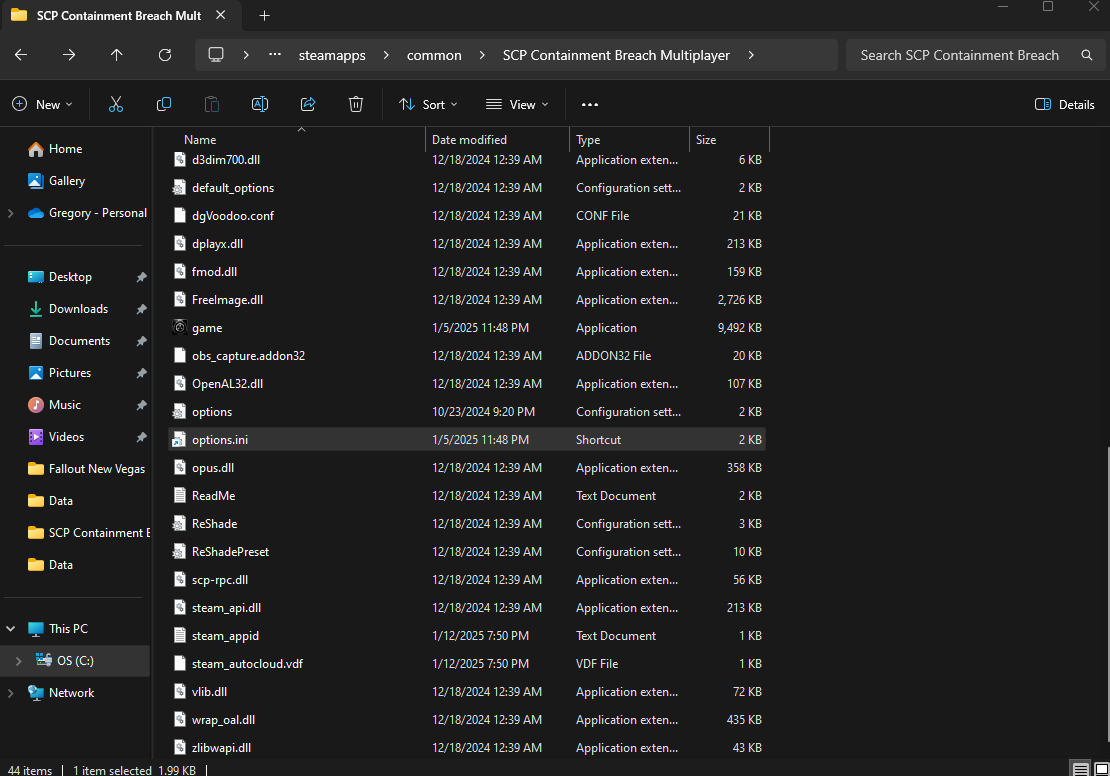
Apri Options.ini

Ora che il file è aperto, dovrai scorrere verso il basso finché non vedi [launcher]
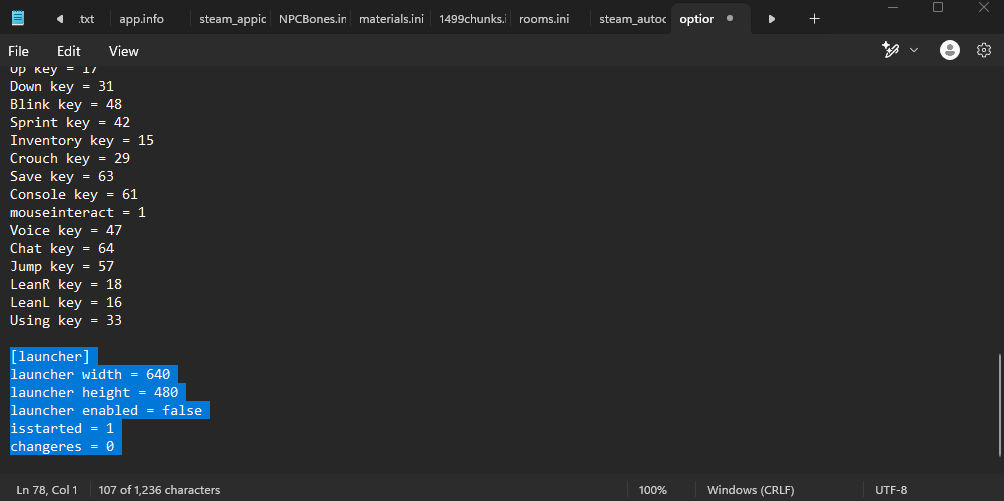
Adesso vorrai cambiare

[launcher]
launcher width = 640
launcher height = 480
launcher enabled = false
isstarted = 1
changeres = 0

A

[launcher]
launcher width = 640
launcher height = 480
launcher enabled = true
isstarted = 1
changeres = 0

Ora non ti resta che salvare le modifiche!

Hai finito!

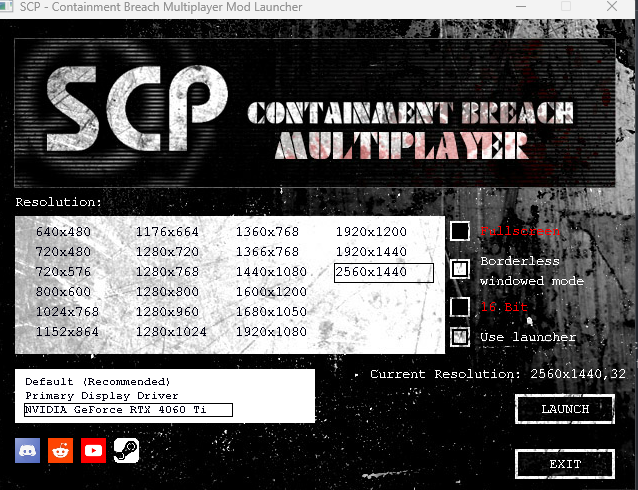
Ora dovresti avere accesso completo al menu di avvio!
Altre guide:

PLAY GUÍAS - CÓDIGOS DE JUEGOS

Play Guías

0
Would love your thoughts, please comment.x
()
x