JOIN OUR TELEGRAM CHANNEL • NO ADS • EXCLUSIVE TIPS
🎮 FREE to join — no subscription, no credit card ⚡ Tricks & codes BEFORE website release 🎁 Limited-time game codes & download keys 🏆 Win STEAM GAMES in global contests 🚫 Zero ads • zero spam • 100% clean 📲 Instant delivery — direct to Telegram 🎮 FREE to join — no subscription, no credit card ⚡ Tricks & codes BEFORE website release 🎁 Limited-time game codes & download keys 🏆 Win STEAM GAMES in global contests 🚫 Zero ads • zero spam • 100% clean 📲 Instant delivery — direct to Telegram
JOIN
WHY JOIN THE CHANNEL?
All perks — zero noise • 100% free
💎
100% FREE to join No subscription, no credit card required — ever
Tricks BEFORE website Get exclusive codes and strategies before anyone else
🎁
Limited-time game codes Temporary download keys — grab them fast, they expire
🏆
Steam Games Giveaways Global contests to win full Steam games & gift cards
🚫
Zero Ads • Zero Spam No promotions, no junk — just pure gaming content
📲
Instant Telegram Delivery Everything arrives directly — faster than websites or email
🔒
Members-Only Content Exclusive guides & secrets never published anywhere else
🌍
Global Community Join gamers worldwide and get real-time alerts
JOIN FOR FREE — GET STEAM CONTESTS & EXCLUSIVE CODES

Desktop Mate: 自動起動ガイド

このガイドでは、コンピューターを開いたときに Desktop Mate を自動起動する方法を説明します。 Desktop Mate の自動起動機能を設定するには、以下の手順に従ってください。

Desktop Mate を自動起動する手順

まずはランチャーへのショートカットを作成します
歯車アイコンをクリックします

「管理」の上にマウスを移動し、「ローカル ファイルを参照」をクリックします。
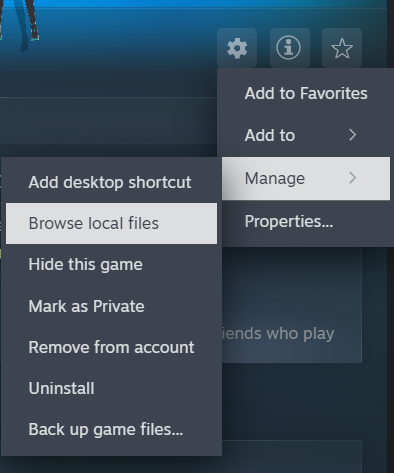
今、あなたをここに連れてくるはずです
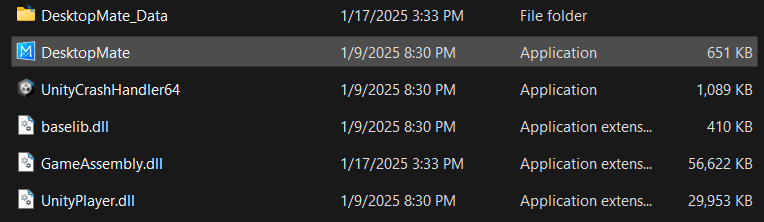
「デスクトップメイト」を右クリック

Windows 11の場合は、「その他のオプションを表示」をクリックします。
「ショートカットを作成」をクリックします

Windows 10の場合は「ショートカットの作成」をクリックします。

これでショートカットができたはずです
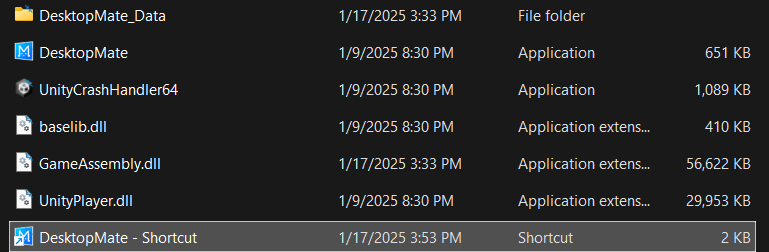
ここで、ショートカットのみを選択し、Ctrl + Xを押します。
次に、WindowsKey + Rを実行すると、このメニューが表示されるはずです
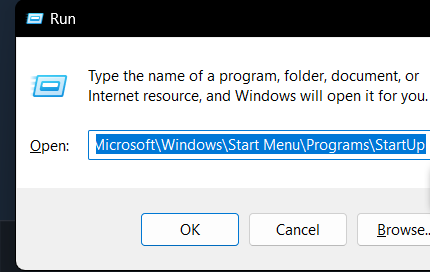
これをボックスに貼り付けます(これは Windows の起動フォルダーです)
C:\Users\ユーザー名\AppData\Roaming\Microsoft\Windows\スタート メニュー\プログラム\スタートアップ

最後に、Ctrl + Vを押してショートカットをフォルダーに貼り付けます。

タダ!自分で起動しなくても毎日ミクを見れるようになりました!

その他のガイド:

  • Desktop Mate: 複数の Desktop Mate を作成する方法 (ステップバイステップ)
  • Desktop Mate: MOD でキャラクターをカスタマイズする方法

PLAY GUÍAS - CÓDIGOS DE JUEGOS

Play Guías

0
Would love your thoughts, please comment.x
()
x