JOIN OUR TELEGRAM CHANNEL • NO ADS • EXCLUSIVE TIPS
🎮 FREE to join — no subscription, no credit card ⚡ Tricks & codes BEFORE website release 🎁 Limited-time game codes & download keys 🏆 Win STEAM GAMES in global contests 🚫 Zero ads • zero spam • 100% clean 📲 Instant delivery — direct to Telegram 🎮 FREE to join — no subscription, no credit card ⚡ Tricks & codes BEFORE website release 🎁 Limited-time game codes & download keys 🏆 Win STEAM GAMES in global contests 🚫 Zero ads • zero spam • 100% clean 📲 Instant delivery — direct to Telegram
JOIN
WHY JOIN THE CHANNEL?
All perks — zero noise • 100% free
💎
100% FREE to join No subscription, no credit card required — ever
Tricks BEFORE website Get exclusive codes and strategies before anyone else
🎁
Limited-time game codes Temporary download keys — grab them fast, they expire
🏆
Steam Games Giveaways Global contests to win full Steam games & gift cards
🚫
Zero Ads • Zero Spam No promotions, no junk — just pure gaming content
📲
Instant Telegram Delivery Everything arrives directly — faster than websites or email
🔒
Members-Only Content Exclusive guides & secrets never published anywhere else
🌍
Global Community Join gamers worldwide and get real-time alerts
JOIN FOR FREE — GET STEAM CONTESTS & EXCLUSIVE CODES

SCP: multijugador de violación de contención: cómo reactivar el iniciador

Esta guía le indicará cómo reactivar el iniciador de juegos en archivos multijugador de SCP Containment Breach.

Adónde ir

En primer lugar, deberás ir a –

Esta PC > SO (C:) > Programa (x86) > steam > steamapps > común > SCP Containment Breach Multijugador

Esto debería llevarte a los archivos del juego.

Qué hacer a continuación

Ahora necesitarás abrir options.ini

Aquí podrás Reactivar el Launcher
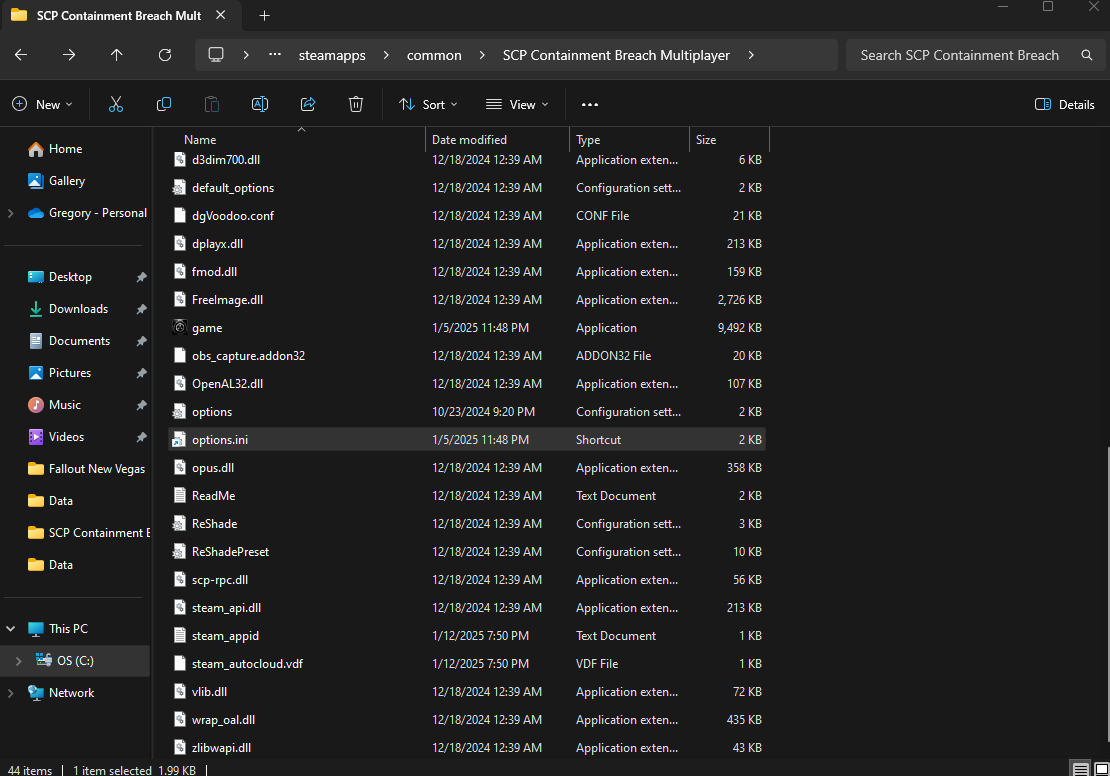
Abra Opciones.ini

Ahora que el archivo está abierto, tendrás que desplazarte hacia abajo hasta que veas [launcher]
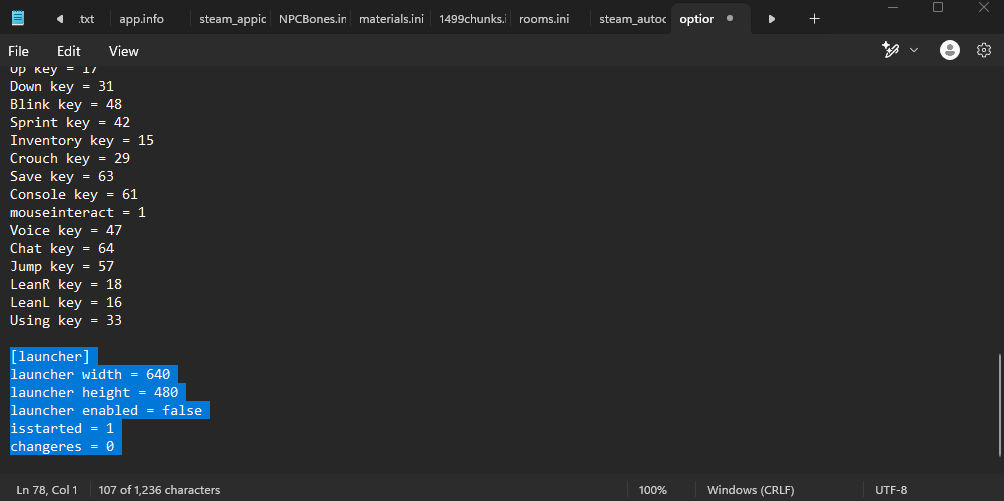
Ahora vas a querer cambiar

[launcher]
launcher width = 640
launcher height = 480
launcher enabled = false
isstarted = 1
changeres = 0

A

[launcher]
launcher width = 640
launcher height = 480
launcher enabled = true
isstarted = 1
changeres = 0

¡Ahora todo lo que tienes que hacer es guardar los cambios!

¡Has terminado!

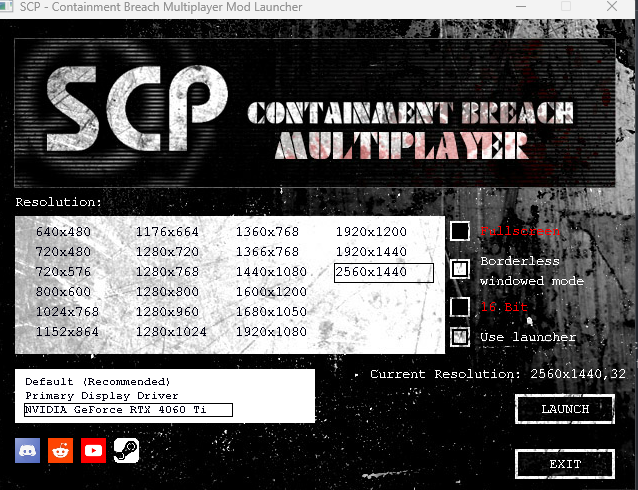
¡Ahora deberías tener acceso completo al menú de inicio!
Más guías:

PLAY GUÍAS - CÓDIGOS DE JUEGOS

Play Guías

0
Would love your thoughts, please comment.x
()
x